Chapter 7: Support & Integration
Supporting system requirements, third-party integrations, and the wireless security ecosystem
A wireless security system does not operate in isolation. Its effectiveness depends on tight integration with a range of supporting systems: identity providers, certificate authorities, device management platforms, security monitoring tools, and network infrastructure services. This chapter describes the integration requirements for each supporting system, the protocols and interfaces used, and the configuration dependencies that must be addressed during deployment.
7.1 Supporting System Integration Ecosystem
The following diagram illustrates all eight supporting systems that integrate with the wireless security platform, along with the protocols, ports, and data flows for each integration. All eight systems are essential for a complete enterprise wireless security deployment — the absence of any single integration creates a security gap that adversaries can exploit.
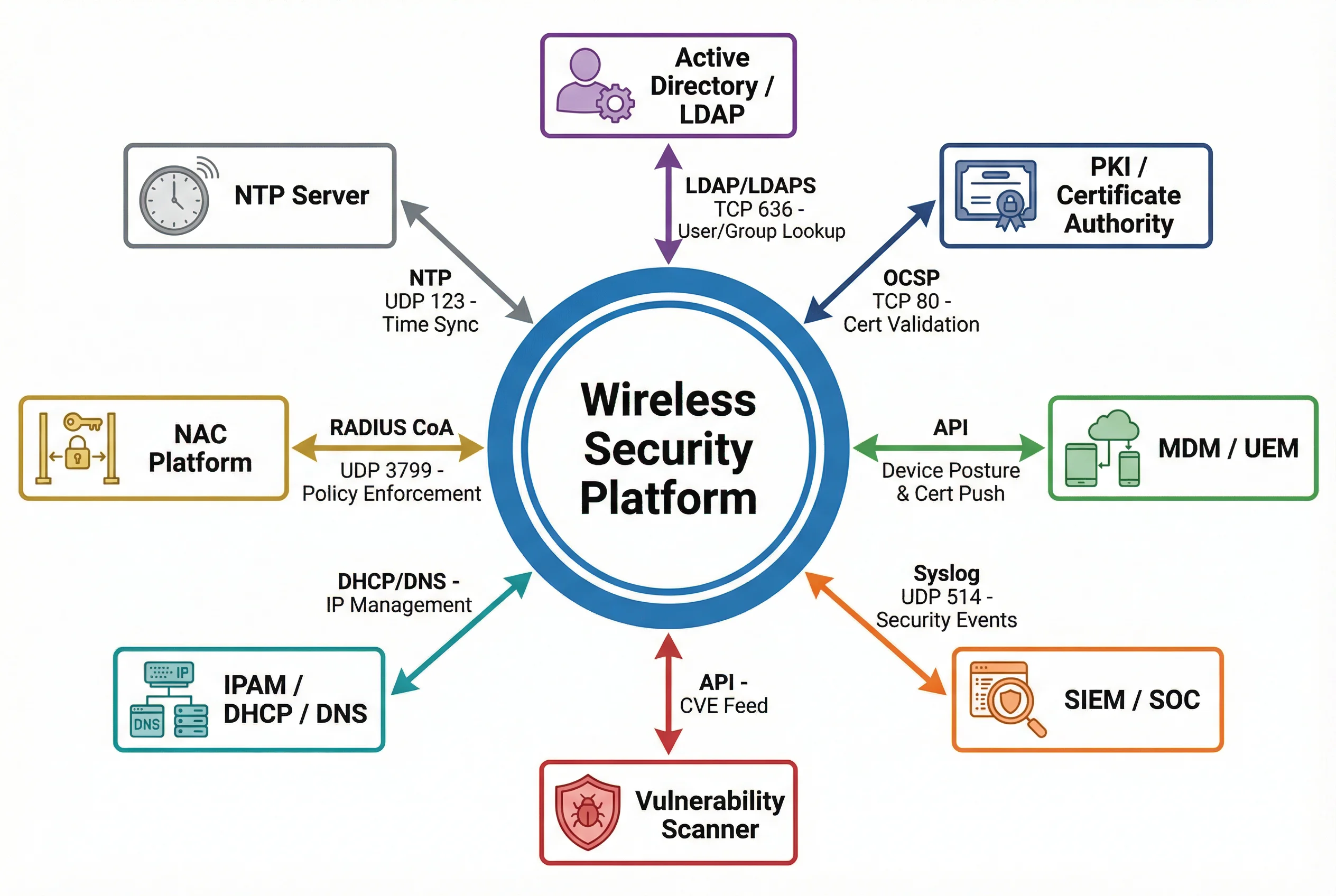
7.2 Supporting System Integration Details
7.2.1 Active Directory / LDAP
The RADIUS server integrates with Active Directory (or any LDAP-compatible directory) to perform user and group lookups during 802.1X authentication. When a user authenticates, the RADIUS server queries AD to verify credentials (for EAP-TTLS/PEAP) or retrieve group membership (for EAP-TLS). Group membership is used to determine VLAN assignment and access policy. The integration uses LDAPS (TCP 636) with mutual TLS to protect directory queries in transit.
| Parameter | Value |
|---|---|
| Protocol | LDAP TCP 389 (dev/test only) / LDAPS TCP 636 (production mandatory) |
| Bind Account | Dedicated service account with read-only directory access |
| Search Base | OU=Users,DC=corp,DC=example,DC=com |
| Group Attribute | memberOf (AD) / groupOfNames (OpenLDAP) |
| VLAN Mapping | AD Group → RADIUS attribute → VLAN ID (configured in RADIUS policy) |
7.2.2 PKI / Certificate Authority
The PKI infrastructure issues and manages all certificates used in the wireless security system: server certificates for RADIUS and WLAN Controller, client certificates for EAP-TLS authentication, and CA certificates distributed to all supplicants for server validation. The RADIUS server queries the OCSP responder in real time during each EAP-TLS authentication to verify that the client certificate has not been revoked. CRL distribution points serve as a fallback when OCSP is unavailable.
| Certificate Type | Issued To | Validity Period | Key Size | Revocation |
|---|---|---|---|---|
| Root CA | Enterprise CA | 10 years | RSA 4096 / ECDSA P-384 | Offline, air-gapped |
| Intermediate CA | Wireless Issuing CA | 5 years | RSA 2048 / ECDSA P-256 | CRL + OCSP |
| RADIUS Server Cert | RADIUS servers | 1–2 years | RSA 2048 / ECDSA P-256 | OCSP |
| Client Cert (EAP-TLS) | Managed devices (via MDM) | 1 year | RSA 2048 / ECDSA P-256 | OCSP (real-time) |
7.2.3 MDM / UEM Integration
Mobile Device Management (MDM) or Unified Endpoint Management (UEM) platforms integrate with the wireless security system in two critical ways: certificate provisioning and device posture enforcement. MDM pushes 802.1X supplicant configuration and client certificates to all managed devices via over-the-air enrollment, ensuring consistent and correct supplicant settings without manual user configuration. MDM also provides device posture data to the NAC platform — OS version, patch level, encryption status, jailbreak detection — which is used to determine the appropriate VLAN assignment.
7.2.4 SIEM / SOC Integration
All wireless security events — authentication successes and failures, WIPS alerts, rogue AP detections, policy violations, and administrative actions — are forwarded to the SIEM in real time via Syslog (UDP 514 or TCP 6514 with TLS). The SIEM correlates wireless events with events from other security systems (firewall, endpoint, identity) to detect complex attack patterns that span multiple systems. Key correlation rules include: multiple authentication failures followed by a successful login (credential stuffing), a new device appearing on the network immediately after a deauth flood (evil twin attack), and an IoT device attempting to communicate with an unexpected destination (compromise indicator).
7.2.5 NAC Platform
The Network Access Control platform enforces dynamic access policies based on device identity, user identity, device posture, and time-of-day. The NAC integrates with the RADIUS server via RADIUS Change of Authorization (CoA, UDP 3799) to dynamically modify a client's VLAN assignment or quarantine a device without requiring re-authentication. This enables real-time response to security events: when the MDM reports that a device has become non-compliant (e.g., OS update required), the NAC sends a CoA to move the device to a restricted VLAN until remediation is complete.
7.2.6 IPAM / DHCP / DNS
IP Address Management (IPAM) integration provides the wireless security system with visibility into IP-to-MAC-to-user mappings, enabling accurate attribution of network events to specific devices and users. DHCP snooping on PoE switches prevents rogue DHCP servers from operating on the wireless network. DNS filtering (integrated with the Guest and IoT VLANs) blocks resolution of known malicious domains, C2 servers, and inappropriate content categories.
7.3 Integration Requirements Summary
| System | Protocol/Port | Direction | Priority | Notes |
|---|---|---|---|---|
| Active Directory | LDAPS TCP 636 | RADIUS → AD | Mandatory | Service account, read-only, TLS required |
| PKI / CA | OCSP TCP 80/443, CRL HTTP | RADIUS → PKI | Mandatory | Real-time revocation check per auth |
| MDM / UEM | REST API HTTPS 443 | Bidirectional | Mandatory | Cert push + posture data |
| SIEM | Syslog UDP 514 / TLS 6514 | All → SIEM | Mandatory | NTP sync required for log correlation |
| NAC | RADIUS CoA UDP 3799 | NAC → RADIUS | Mandatory | Dynamic VLAN change and quarantine |
| IPAM/DHCP/DNS | DHCP UDP 67/68, DNS UDP 53 | Bidirectional | Recommended | IP attribution and DNS filtering |
| Vulnerability Scanner | REST API HTTPS 443 | Scanner → Platform | Recommended | CVE feed for AP firmware risk tracking |
| NTP | NTP UDP 123 | All → NTP | Mandatory | All devices must sync to same NTP source |