Chapter 8: Tools & Accessories
Complete accessories catalog, installation tools, testing equipment, and bill of materials for wireless security deployments
A successful wireless security deployment requires not only the core network equipment but also a comprehensive set of accessories, mounting hardware, cabling components, and testing tools. This chapter provides a complete accessories catalog and bill of materials to ensure that all necessary items are procured before installation begins. Missing accessories are a common cause of installation delays and should be verified against this list during the pre-deployment planning phase.
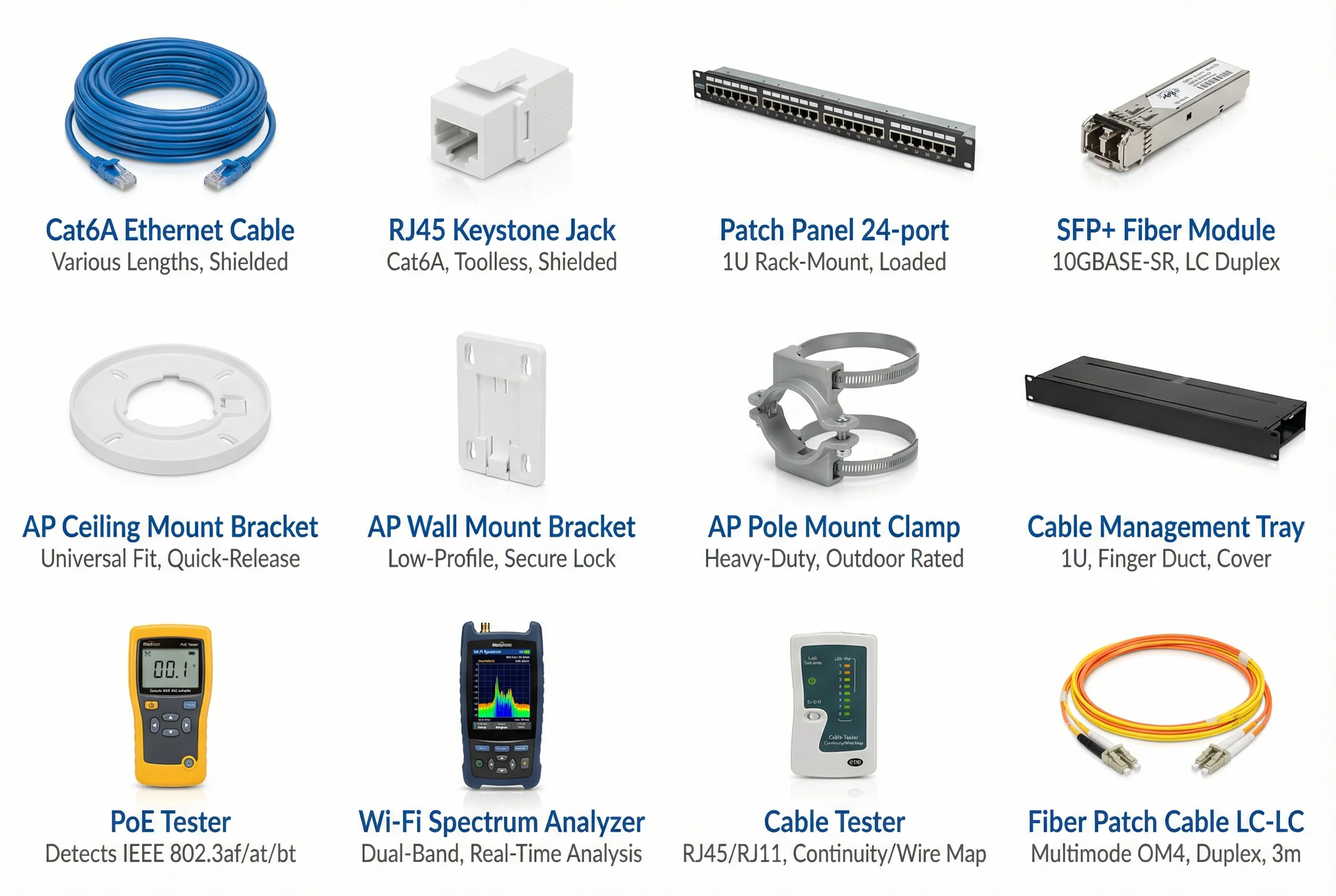
8.1 Accessories & Tools Catalog
8.2 Accessories Bill of Materials
The following bill of materials covers all accessories required for a standard enterprise wireless security deployment. Quantities should be adjusted based on the specific site survey results and AP count. All cable lengths should be measured on-site and include a 10–15% slack allowance for routing and future moves.
8.2.1 Cabling and Connectivity
| Item | Specification | Unit | Qty per 10 APs | Notes |
|---|
| Cat6A Ethernet Cable | Shielded (STP), LSZH jacket, 23 AWG, TIA-568-C.2-1 | Meter | ~1,200m | Max 100m per run; include 15% slack |
| RJ45 Keystone Jack | Cat6A, toolless, shielded, 180° or 90° exit | Each | 20–30 | 2–3 per AP location (wall plate) |
| Patch Panel 24-port | Cat6A, 1U rack-mount, loaded with keystones | Each | 1 | One panel per 24 AP runs |
| Patch Cable (short) | Cat6A, 0.5m–1m, RJ45 both ends, various colors | Each | 20 | Patch panel to switch connections |
| SFP+ Fiber Module | 10GBASE-SR, LC duplex, OM4, 300m reach | Each | 4 | Inter-rack and uplink connections |
| Fiber Patch Cable LC-LC | OM4 multimode, duplex, 3m / 5m / 10m | Each | 4 | Match length to rack spacing |
| Cable Labels | Wrap-around, printable, UV-resistant | Pack (100) | 1 | Label both ends of every cable run |
| Cable Ties / Velcro Straps | Reusable velcro, 200mm, mixed colors | Pack (50) | 1 | Cable management in racks and ceiling |
8.2.2 Mounting Hardware
| Item | Specification | Unit | Qty per 10 APs | Notes |
|---|
| AP Ceiling Mount Bracket | Universal fit, quick-release, white, T-bar compatible | Each | 8–10 | For suspended ceiling installations |
| AP Wall Mount Bracket | Low-profile, secure lock, adjustable tilt, white | Each | 2–4 | For wall or column mounting |
| AP Pole Mount Clamp | Heavy-duty, stainless steel, 40–80mm pole diameter, outdoor rated | Each | 2–4 | For outdoor lamp post or mast mounting |
| Anchor Bolts / Drywall Anchors | M6 or #10, appropriate for ceiling/wall material | Pack (20) | 1 | Match to ceiling/wall substrate |
| Cable Management Tray | 1U, finger duct with cover, 19" rack-mount, black | Each | 1 | One per rack for horizontal cable management |
| Rack Screws and Cage Nuts | M6 × 16mm, zinc-plated, with cage nuts | Pack (50) | 1 | For rack-mount equipment installation |
8.2.3 Testing and Commissioning Tools
| Tool | Specification | Purpose | Required |
|---|
| PoE Tester | Detects IEEE 802.3af/at/bt; displays voltage, current, power class | Verify PoE delivery to APs before installation | Mandatory |
| Cable Tester | RJ45/RJ11, continuity, wire map, length measurement, Cat6A rated | Verify cable runs before patching | Mandatory |
| Wi-Fi Spectrum Analyzer | Dual-band 2.4/5GHz, real-time spectrum display, channel utilization | Identify RF interference sources pre/post deployment | Mandatory |
| Wi-Fi Site Survey Tool | Software (laptop-based), heatmap generation, coverage analysis | Pre-deployment site survey and post-deployment validation | Mandatory |
| Optical Power Meter | OM4 multimode, LC connector, dBm display | Verify fiber link loss for SFP+ connections | Recommended |
| Network Multimeter | PoE, VLAN, ping, cable test in one handheld device | Field troubleshooting during installation | Recommended |
| Laptop with Admin Tools | SSH client, web browser, Wireshark, 802.1X supplicant test | Configuration and commissioning | Mandatory |
8.3 Consumables and Spares
Recommended Spare Parts Policy: Maintain a minimum of 5% spare APs, 10% spare PoE ports, and 2 spare SFP+ modules per site. For critical deployments (healthcare, manufacturing), increase spare AP inventory to 10%. Store spares in a climate-controlled environment and rotate stock annually to prevent component degradation.
| Item | Spare Qty (per 50 APs) | Rationale |
|---|
| Indoor AP | 3 units (6%) | Hardware failure, accidental damage |
| Outdoor AP | 2 units (10%) | Environmental damage, vandalism |
| PoE Switch (24-port) | 1 unit | Switch failure coverage |
| SFP+ Module | 4 units | Transceiver failure, new connections |
| Cat6A Cable (pre-made, 3m) | 10 units | Patch cable replacements |
| AP Ceiling Bracket | 5 units | Damaged or lost during installation |
| RJ45 Keystone Jack | 20 units | Damaged during termination |